LoRA Makes Fine-Tuning LLMs Practical
LoRA cuts LLM fine-tuning to a small adapter layer, reducing VRAM, training time, and cost for teams with modest GPUs.

LoRA fine-tunes large language models by training small adapter weights instead of the full model.
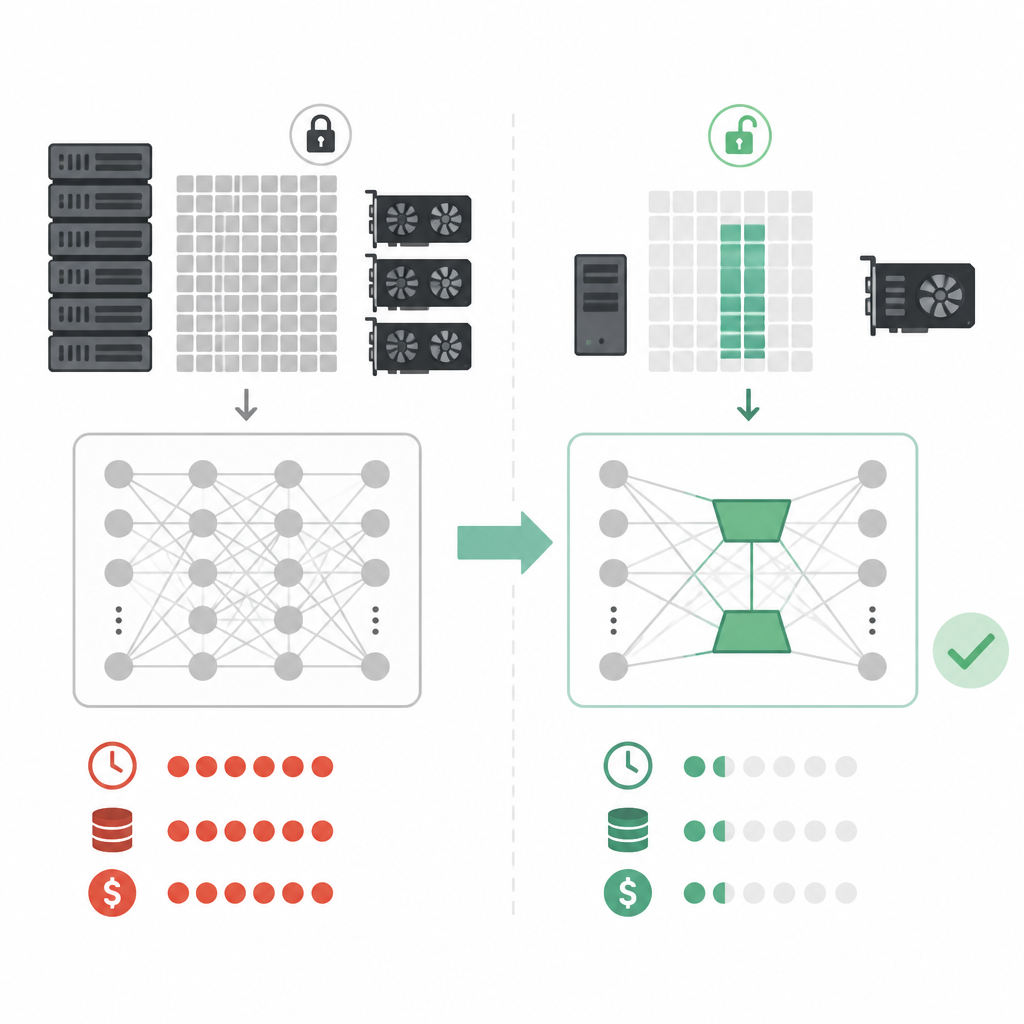
Fine-tuning a 7B model no longer has to mean a giant GPU bill. In Exxact’s LoRA guide, the difference between full fine-tuning, LoRA, and QLoRA is measured in tens or hundreds of gigabytes of VRAM, plus the number of GPUs you need to keep the job moving.
| Method | Approx. VRAM per 1B params | Approx. VRAM for 32B model | Example GPU setup |
|---|---|---|---|
| Full fine-tuning | ~16 GB | ~512 GB | 4x NVIDIA H200 NVL or 8x RTX PRO 6000 |
| LoRA (FP16/BF16) | ~2 GB + overhead | ~64 GB | 2x NVIDIA RTX 5090 or 1x RTX PRO 6000 |
| QLoRA (4-bit) | ~0.5 GB + overhead | ~16 GB | 1x NVIDIA RTX 5080 or 1x RTX PRO 4500 |
Why LoRA changed the fine-tuning math
Get the latest AI news in your inbox
Weekly picks of model releases, tools, and deep dives — no spam, unsubscribe anytime.
No spam. Unsubscribe at any time.
Exxact’s article is really about one thing: making model customization fit into hardware that normal teams can actually buy and operate. LoRA, short for Low-Rank Adaptation, freezes the base model and trains a small set of adapter weights on top of it.

That matters because full fine-tuning updates every parameter in the model. For a modern LLM, that can mean billions of weights, huge optimizer states, and a training setup that eats VRAM fast. LoRA trims the trainable portion down to roughly 1% to 2% of the model, which changes the economics of the whole workflow.
The practical effect is simple. You keep the foundation model intact, add task-specific adapters, and reuse the same base model for several jobs without retraining from scratch each time.
- Trainable parameters drop to a small fraction of the full model.
- GPU memory pressure falls because most weights stay frozen.
- Training runs finish faster because fewer values change on each step.
- Teams can keep separate adapters for support, search, legal, or coding tasks.
LoRA vs QLoRA: same idea, tighter memory budget
The article also draws a clean line between LoRA and QLoRA. With LoRA, the base model is usually loaded in FP16 or BF16, then adapter matrices are trained on top. With QLoRA, the base model is quantized to 4-bit, which lowers memory use even more while the adapters still train normally.
The tradeoff is familiar to anyone who works with model compression: less memory usually means more care with quality checks. Exxact notes that rank, optimizer choice, batch size, and sequence length all affect the final footprint. If your context length grows, activation memory can dominate quickly, even if the base model itself is light enough to fit.
"LoRA allows us to fine-tune large language models efficiently by updating only a small number of parameters instead of retraining the entire model."
That line captures the whole pitch. You are not paying to move every weight in the network when your real goal is often much narrower, like adapting a general model to your company’s tone, domain vocabulary, or support workflows.
It also explains why the rank setting matters so much. Higher rank gives the adapter more capacity, but it also increases compute and memory use. In practice, teams end up tuning this knob the same way they tune batch size or learning rate: with tests, not guesses.
What the VRAM numbers mean in practice
The most useful part of the Exxact post is the hardware guidance. A 7B model can be workable with QLoRA on 8GB or 12GB GPUs, though that comes with tight batch sizes and slower training. Once you move into 32B to 70B territory, workstation-class and multi-GPU setups start making more sense.
Exxact says 2x NVIDIA RTX 5090 cards can handle LoRA tuning for a 32B model, while 2x NVIDIA RTX PRO 6000 Blackwell GPUs give 192GB of total VRAM. For even larger workloads, 4x RTX PRO 6000 Blackwell GPUs push total memory to 384GB, which opens the door to models around 140B parameters in a single node.
- Up to 7B parameters with QLoRA: 8GB to 12GB cards may work.
- Up to 32B to 70B parameters: multi-GPU workstations become practical.
- 4x RTX PRO 6000 Blackwell: 384GB total VRAM for heavier training jobs.
- Full fine-tuning of a 32B model: about 512GB VRAM, which is a very different class of hardware need.
Those numbers matter because they show why LoRA is more than a research trick. It changes who can run fine-tuning at all. A team that would never reserve a data-center cluster for every experiment can now test adapter variants on workstation hardware and keep the base model stable.
For teams comparing options, the cost story is easy to read too. Full fine-tuning means more GPUs, more power, more time, and more operational friction. LoRA reduces all four, while QLoRA pushes the memory requirement down again if your quality target and workload can tolerate quantization.
Why this matters for real teams
The strongest argument for LoRA is not theoretical efficiency. It is workflow control. If you run a product team, a support team, or an internal AI group, you probably do not want every customization to turn into a weeks-long infrastructure project.
LoRA makes it easier to create small adapters for different jobs, version them separately, and swap them without touching the base model. That means you can test a customer support tone one week, a legal summarizer the next, and a coding assistant after that, all without retraining a giant model from zero.
It also makes rollback simpler. If an adapter hurts accuracy on a test set, you can replace it without disturbing the base model. That is a much cleaner release process than constantly changing the core model weights.
For teams already thinking in deployment terms, that matters more than raw benchmark numbers. A fine-tuning method is useful when it lets you move faster without creating a maintenance headache, and LoRA does exactly that.
What to watch before you commit
LoRA is practical, but it is not magic. You still need to pay attention to sequence length, optimizer overhead, and whether your GPU has enough room for activations. If you are working with long prompts or large batches, memory can disappear faster than the adapter math suggests.
The real takeaway is that LoRA gives you a sane default for most customization work. Start with LoRA when you want to adapt a model to a domain, use QLoRA when memory is tight, and reserve full fine-tuning for cases where you truly need every parameter available.
That is why the article matters now: it translates fine-tuning from an infrastructure-heavy exercise into something a normal AI team can plan around. The next question is not whether LoRA works, but which adapter strategy fits your model size, GPU budget, and release cadence best.
// Related Articles
- [TOOLS]
Cursor’s latest update proves IDEs must become workflow tools
- [TOOLS]
Cursor’s Bugbot belongs before the push, not in the PR
- [TOOLS]
Prompt engineering is a writing skill, not a magic trick
- [TOOLS]
Open-Notebook turns NotebookLM into open source
- [TOOLS]
GPU Mag’s list turns GPU tests into a workflow
- [TOOLS]
OpenAI pricing turns token math into budgets