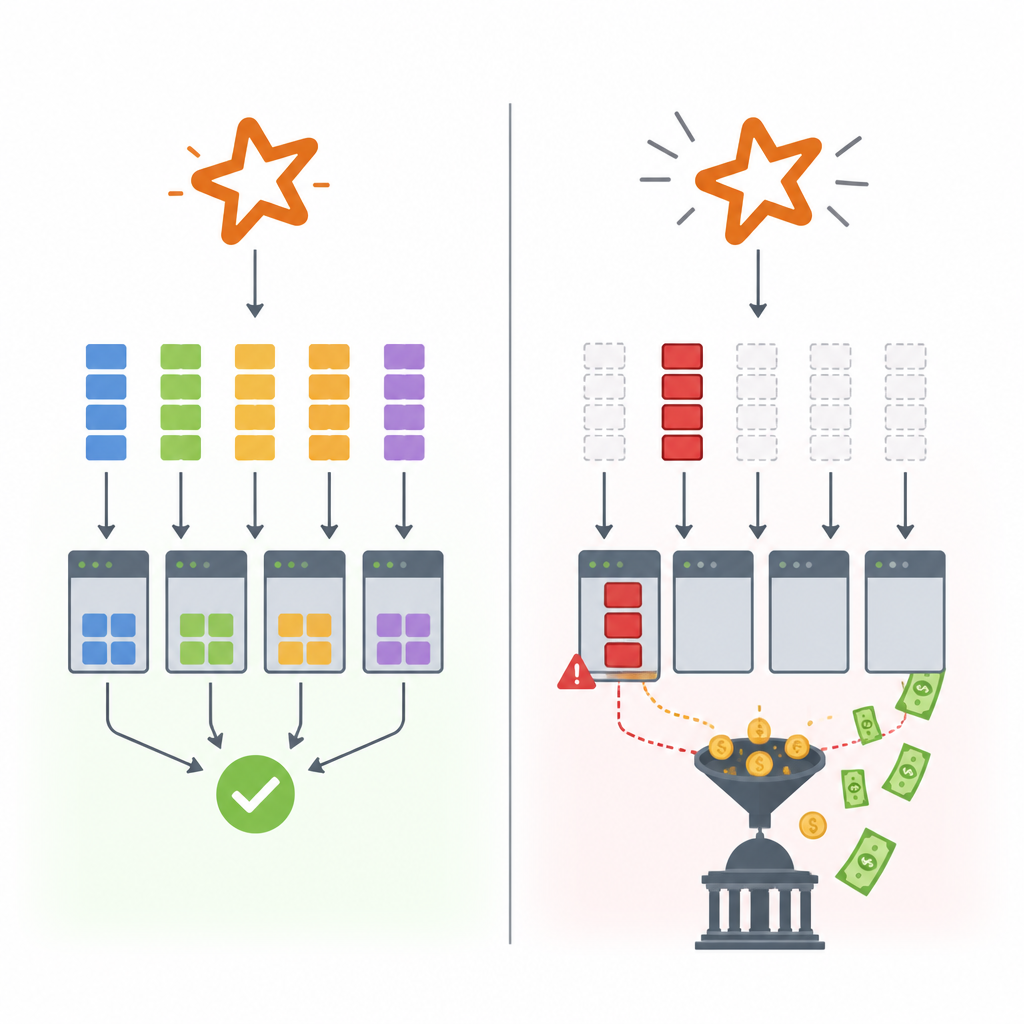
Bad partitioning quietly turns distributed jobs into slow, expensive messes.
I’ve been around enough Spark jobs and warehouse pipelines to know when a system is lying to me. The UI says the cluster is busy. The job eventually finishes. The dashboards even look fine if you squint hard enough. But the bill is ugly, the SLA is slipping, and every “simple” query turns into a tiny distributed war.
What usually feels off is partitioning. Not the glamorous kind people put in architecture diagrams, but the boring, practical thing that decides where data lands, how much gets scanned, which tasks get crushed, and whether one unlucky executor becomes the bottleneck for everybody else. I’ve seen teams blame the engine, the storage layer, even the network, when the real problem was that their data was chopped up in a way that made the system work against itself.
That’s why Seshendranath Balla’s HackerNoon piece, The Hidden Cost of Poor Data Partitioning in Distributed Systems, caught my attention. It’s a practical warning from someone who’s spent years in data engineering, not a theory dump. The article is about the hidden tax you pay when partitioning is an afterthought, especially in Spark-heavy and lakehouse-style systems.
Partitioning is not metadata trivia, it’s workload control
Get the latest AI news in your inbox
Weekly picks of model releases, tools, and deep dives — no spam, unsubscribe anytime.
No spam. Unsubscribe at any time.
“Poor partitioning can lead to significant performance degradation, increased resource consumption, and higher operational costs.”
What this actually means is simple: partitioning decides how much work each query has to do and how evenly that work gets spread around. If the layout is bad, the engine has to scan too much data, shuffle too much data, or wait on one giant partition while the rest of the cluster sits there looking productive.
I ran into this years ago on a Spark pipeline that looked clean on paper. We partitioned by a field that seemed “business meaningful,” which is always where trouble starts. The result was a few massive partitions, a pile of tiny ones, and one daily job that behaved like a random number generator. Some days it ran fast. Some days it crawled. The storage format hadn’t changed. The data volume had barely changed. The layout was the problem.
The article’s core point is that partitioning is a control surface. It affects scan pruning, parallelism, shuffle volume, task skew, and storage efficiency. If you treat it like a one-time schema choice, you’ll keep paying for it every time the pipeline runs.
How to apply it: before you choose a partition key, ask what the most common filters, joins, and access paths are. If your users always query by date and tenant, that matters more than whatever field looks tidy in a ER diagram. And if you can’t explain why a partition key helps the workload, you probably don’t have a good one.
Optimize for read patterns first, not for naming elegance.
Watch for skew whenever one value can dominate the table.
Revisit partition choices when query patterns change, because they will.
Hot partitions are just bottlenecks wearing a nicer name
The article talks about data skew, and that’s the part people underestimate. One partition gets too much traffic, too much data, or too many records with the same key. Everything else may be fine, but that one hot partition drags the whole job down like a dead anchor.
In distributed systems, unevenness is expensive. A cluster doesn’t finish when the average task is done. It finishes when the slowest task is done. That’s why a single oversized partition can dominate runtime, inflate memory pressure, and create retries that make the whole run feel flaky.
I’ve seen this happen with time-based partitions too. Everyone loves partitioning by day until one day is Black Friday, month-end close, or a product launch. Then one partition is 20 times larger than the rest and your “balanced” design becomes a very expensive joke.
What this actually means is that partitioning needs guardrails. You can’t just pick a key and hope the distribution behaves. You need to inspect cardinality, frequency spread, and the shape of the data over time. If you don’t, the system will happily hide the imbalance until production makes it impossible to ignore.
How to apply it: sample your key distribution before you commit. Look at the top values, the minimum and maximum partition sizes, and the ratio between them. If a small set of keys owns a huge fraction of the rows, you may need composite partitioning, salting, bucketing, or a different access strategy entirely.
Check key frequency, not just distinct count.
Test with real production-like data, not only synthetic samples.
Assume one “special” day or tenant will eventually break your balance.
Small partitions feel tidy until the scheduler starts screaming
Poor partitioning doesn’t only mean oversized chunks. It also means too many tiny ones. That’s the other side of the same mess, and it’s just as annoying. The scheduler has overhead. The metadata layer has overhead. File open costs are real. If you create a forest of tiny partitions, your system spends more time managing work than doing work.
This is one of those problems that makes teams think the engine is “slow” when the real issue is self-inflicted overhead. I’ve watched jobs spend forever launching tasks, reading tiny files, and thrashing through metadata. No single task was expensive, which made the problem harder to spot. The cluster looked busy, but it was busy doing administrative nonsense.
The HackerNoon article’s warning about operational cost matters here. Poor partitioning can drive up compute usage even when the data volume is modest. You pay in extra task scheduling, extra file system calls, extra shuffles, and extra human time spent trying to explain why a simple aggregation takes forever.
How to apply it: don’t over-partition just because parallelism sounds good in theory. Match partition count to the size of the data and the shape of the workload. In Spark, too many partitions can be just as bad as too few. In lakehouse tables, too many small files and partitions can make compaction and planning painfully expensive.
When I tune jobs, I look for the point where partitions are large enough to reduce overhead but small enough to keep the cluster fed. That balance is not elegant. It’s empirical. Measure it.
Partition pruning only helps if you actually give it something to prune
The nice thing about good partitioning is that query engines can skip data they don’t need. The bad thing is that this only works when the query filter lines up with the partition layout. If the layout and access pattern disagree, the engine scans more than it should, and every query becomes a broader hunt than necessary.
This is where a lot of teams fool themselves. They say the table is partitioned, so it must be optimized. Not really. A partitioned table with the wrong key is just a table with extra ceremony. If queries filter on customer_id but the table is partitioned by ingestion date, you might get some operational convenience, but you won’t get much scan reduction for the actual workload.
I’ve been burned by this in analytics systems where the partition key was chosen for pipeline simplicity, not query behavior. The ETL team loved it. The analysts hated it. The storage costs crept up because the engine kept reading more than it needed. That’s the hidden tax: the system still works, just less efficiently every day.
How to apply it: map your top queries to your partition layout. If the same filters appear again and again, align the table structure with them. If you have multiple dominant access patterns, consider whether one partition key is enough or whether you need a different physical design for different workloads.
Use partition pruning only where it matches real filters.
Separate ingest convenience from query efficiency in your design review.
Re-check partitioning whenever the business starts asking new questions.
Cardinality is where good intentions go to die
The article’s topic tags include “cardinality-trap,” and that’s exactly the right phrase. Cardinality is seductive because it sounds like a neat math problem. High cardinality can mean too many partitions, too much metadata, and too much fragmentation. Low cardinality can mean giant partitions, skew, and poor pruning. Either way, people often pick a key with no real understanding of how it behaves at scale.
What this actually means is that partitioning is not about picking a field with a nice number of distinct values. It’s about understanding how that field behaves under your workload. A field that looks balanced in a sample can become wildly uneven in production. A field with great pruning potential can still create terrible write amplification if it changes too often.
I’ve seen teams obsess over “perfect” cardinality and miss the bigger issue: the key has to be stable, useful, and predictable under load. If the key changes every few minutes, or if it concentrates traffic into a few values, you’re setting yourself up for pain no matter how pretty the design looks in a spreadsheet.
How to apply it: profile the candidate key across time, not just across rows. Look at how it changes by hour, day, tenant, or region. Then compare that to the actual workload. Sometimes the best answer is a composite strategy. Sometimes it’s bucketing. Sometimes it’s not partitioning at all, and that’s fine too.
And yes, I’d rather tell a team “don’t partition this table” than watch them build a fragile partition scheme that becomes a maintenance hobby.
Operational cost is the part people forget until finance asks
One of the strongest parts of Balla’s article is the reminder that poor partitioning is not just a performance problem. It becomes an operational cost problem. That includes compute waste, storage inefficiency, longer jobs, more retries, and more engineering time spent diagnosing slowdowns that should never have existed.
That’s the ugly part. Bad partitioning is rarely a dramatic outage. It’s a slow bleed. Each job is a little slower. Each query uses a little more memory. Each compaction run takes a little longer. Then one quarter later someone asks why the cloud bill jumped and nobody has a clean answer because the waste was spread across hundreds of “small” inefficiencies.
I’ve had to explain that exact kind of bill before, and it’s not fun. You can’t point to one spectacular failure. You point to a design decision that made everything slightly worse. That’s why partitioning deserves architecture-level attention, not just implementation-level attention.
How to apply it: add partition health to your regular data review. Track file sizes, partition counts, skew, scan volume, and job runtime. Make it somebody’s job to notice when the layout stops matching the workload. And when it does, fix the layout before you add more compute and pretend the problem is solved.
Track cost per job, not just job success.
Watch for drift in partition size over time.
Prefer redesign over endless cluster scaling when layout is the root cause.
The template you can copy
# Data partitioning review template

## 1) Workload summary
- Primary readers:
- Top queries:
- Top joins:
- Write pattern:
- Freshness requirement:

## 2) Candidate partition key
- Proposed key:
- Why we chose it:
- What queries it helps:
- What writes it hurts:

## 3) Distribution check
- Distinct values:
- Top 10 values by frequency:
- Largest partition size:
- Smallest partition size:
- Skew ratio:
- Hot key risk:

## 4) Engine fit
- Partition pruning benefit:
- Shuffle reduction benefit:
- File count impact:
- Metadata overhead risk:
- Compaction needs:

## 5) Failure modes
- What happens on peak days:
- What happens with new tenants or regions:
- What happens when the access pattern changes:
- What happens if the key becomes too sparse:

## 6) Decision
- Keep as-is:
- Change key:
- Use composite partitioning:
- Use bucketing/salting:
- Do not partition:

## 7) Validation plan
- Sample dataset used:
- Query benchmark:
- Runtime baseline:
- Cost baseline:
- Recheck date:

## 8) Review checklist
- [ ] Partition key matches real filters
- [ ] No obvious hot partitions
- [ ] Partition count is manageable
- [ ] File sizes are healthy
- [ ] Query pruning is measurable
- [ ] Cost impact is documented
This is the version I wish more teams used before they shipped a partitioning strategy and then spent the next six months defending it out of inertia. It forces the conversation away from vibes and into workload facts.
If I were dropping this into a real team process, I’d use it in design review, before table creation, and again after the first production week. Partitioning is not a “set it and forget it” decision. It’s a living choice that has to match how the system is actually used.
Source attribution: the original article is The Hidden Cost of Poor Data Partitioning in Distributed Systems by Seshendranath Balla on HackerNoon. My breakdown is derivative commentary and a practical template built from that source, not a verbatim reproduction.