Redis Vector Search: Quick Start Guide Explained
Redis can store vectors, metadata, and search them with semantic queries. This guide shows the setup, indexing, and KNN search path.

Redis can do more than cache sessions and queue jobs. In its vector search quick start, Redis shows how to store embeddings, build an index, and run KNN queries with the same data store you may already use for speed-sensitive apps.
The appeal is practical: you can keep metadata and vectors together, then query by meaning instead of exact words. That matters when your app needs semantic search, retrieval-augmented generation, or recommendation flows that react in milliseconds.
What Redis is doing in this guide
Get the latest AI news in your inbox
Weekly picks of model releases, tools, and deep dives — no spam, unsubscribe anytime.
No spam. Unsubscribe at any time.
The guide walks through a simple pipeline: load documents, generate embeddings, write them into Redis, create a search index, and query the results. It uses Redis Stack vector search features and the Python client redis-py, plus RedisVL for vector-heavy workflows.

That choice matters because the guide is not abstract theory. It is a working recipe for turning unstructured text into searchable vectors, then querying those vectors with Redis Search. If your team already uses Redis for caching or pub/sub, the learning curve is much shorter than adopting a separate vector store.
The document also makes a clear distinction between keyword search and semantic search. Keyword search looks for exact terms. Vector search compares embeddings, so a query for “car repair” can still find content about “automotive maintenance” if the model has learned the relationship.
- Data type: unstructured text, images, video, and audio
- Storage: JSON documents or hashes with vector fields
- Search method: semantic similarity using embeddings
- Indexing: secondary indices built with Redis Search
- Query style: K-nearest neighbors, often called KNN
Why embeddings change the search problem
Embeddings turn messy content into lists of numbers that capture meaning. In the guide, Redis uses SentenceTransformers to generate those vectors from text. Once the embedding exists, Redis can compare documents by distance in vector space rather than by string matching.
That is the part developers usually care about most: the database is not “understanding” language in a human sense, but it is good enough to rank similar items close together. For product teams, that often means better search relevance, fewer empty-result pages, and cleaner retrieval for LLM apps.
Redis also keeps the metadata next to the vector. That lets you filter by tags, timestamps, categories, or numeric fields before or during the vector search. In practice, that means you can search “articles about payments” and then narrow to a specific region or publication date without moving data to another system.
“The best way to predict the future is to invent it.” — Alan Kay
That quote fits this guide because the stack is shaped around building, not theorizing. You can create a vector index, test the results, and adjust the model or schema as soon as the ranking feels off.
How the Redis quick start is structured
The tutorial begins with package installation and a Redis connection, then moves into loading a demo dataset. It uses pip, a Python virtual environment, and a Redis Cloud database or local Redis installation. From there, the code fetches JSON data, inspects one document, stores the records, and adds embeddings.
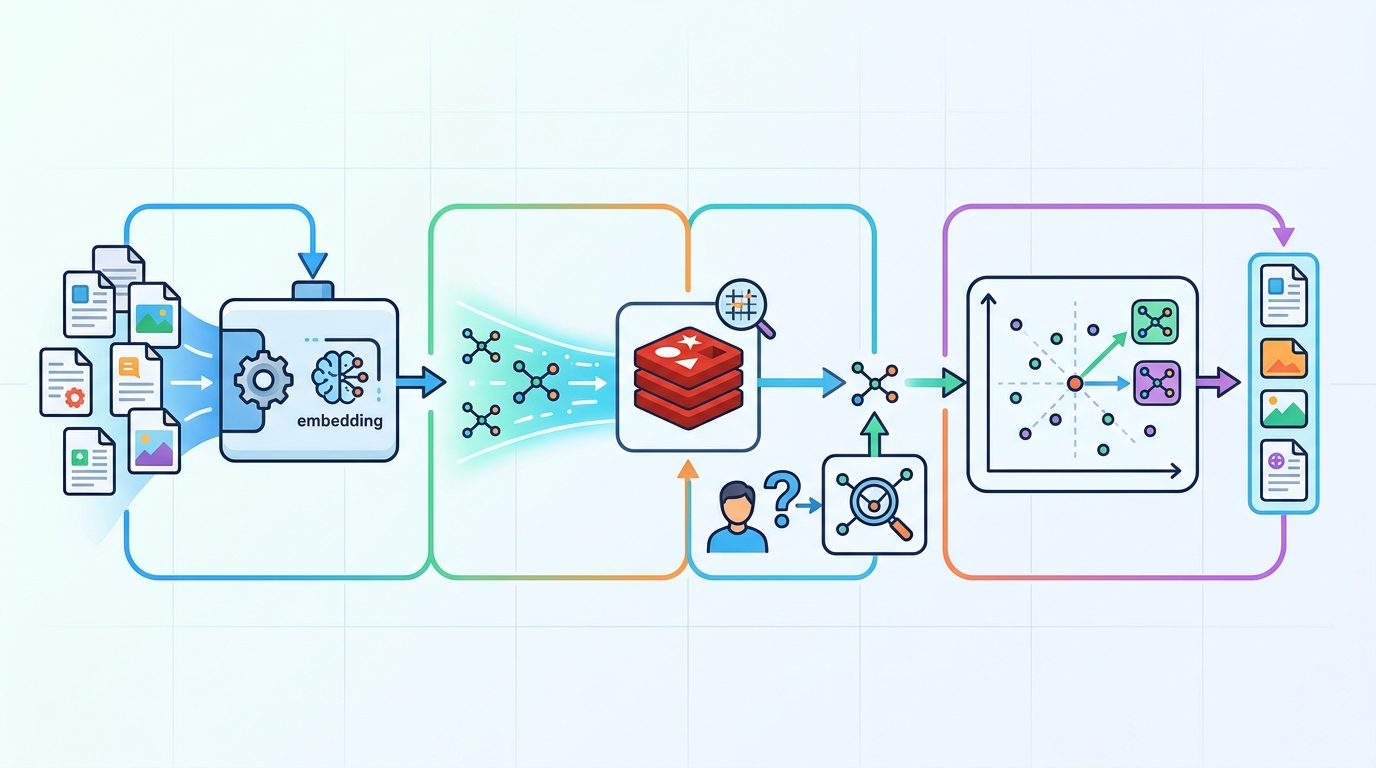
After the data is in place, the guide creates an index with FT.CREATE and checks it with FT.INFO. That sequence is useful because it mirrors what you would do in a real app: load data, confirm the schema, then query against the index.
The search step uses KNN queries, which are a good fit when you want the nearest semantic matches rather than a strict boolean filter. Redis returns the closest vectors, and the app can render the results in a Pandas table for inspection.
- Python packages: redis, pandas, sentence-transformers, tabulate
- Data loading: JSON.SET with pipelining to reduce round trips
- Indexing: FLAT vector indexing with COSINE distance
- Validation: FT.INFO for index state and stats
- Querying: FT.SEARCH with KNN for semantic retrieval
How Redis compares with the usual vector stack
Redis is not the only way to store embeddings, and the quick start does a good job of showing where it fits. If you want a specialized vector database, you may compare it with Pinecone, Qdrant, or Weaviate. Those tools focus heavily on vector retrieval. Redis takes a broader database route and adds vector search to a system many teams already know.
That broader approach can save operational work. You do not need one system for cache, another for document storage, and a third for semantic search if Redis already fits your latency and deployment model. The tradeoff is that Redis is usually chosen for its speed and simplicity, while a dedicated vector platform may give you more opinionated tooling around embeddings at scale.
Here is the practical comparison that matters for a developer deciding what to try first:
- Redis: strong if you already run Redis and want vector search alongside app data
- Pinecone: managed vector retrieval with a narrow focus on similarity search
- Qdrant: open source vector database with a retrieval-first design
- Weaviate: vector database with schema and search features built around semantic apps
For teams building retrieval-augmented generation, the decision often comes down to control and consolidation. If your app already depends on Redis for sessions or caching, adding vector search there can simplify architecture. If your workload is almost entirely semantic retrieval, a dedicated vector store may still be the cleaner fit.
What this means for app builders
The main lesson from Redis’s quick start is that vector search is no longer a separate science project. You can build a working semantic search flow with a familiar database, a Python client, and a transformer model in a single afternoon.
My read: Redis is a smart first stop for teams experimenting with embeddings in production-like conditions, especially when latency matters and the rest of the app already lives near Redis. If your next feature is semantic search or RAG, the most useful next step is to run this quick start on your own data, then compare recall and latency against your current search setup.
One concrete prediction: more teams will treat Redis as a mixed workload store for cache, metadata, and vectors, instead of splitting those jobs across separate systems. The question is whether your app benefits more from consolidation or from a specialized vector engine, and the only honest answer comes from testing both on real queries.
For a related deep dive, see our guide on Redis for RAG workflows and compare how retrieval changes when the database sits closer to the application logic.
// Related Articles
- [TOOLS]
Aliyun Bailian Token Plan turns credits into agents
- [TOOLS]
One API gateway turns six AI APIs into one
- [TOOLS]
OpenAI FDEs turn broken agents into shipped systems
- [TOOLS]
Anthropic’s daily brief turns news into a workflow
- [TOOLS]
Claude Reflect turns usage into retention
- [TOOLS]
Midjourney turns prompt ideas into art