CUDA Architecture Explained: SMs, Cores, Memory
CUDA GPUs split work across SMs, thousands of cores, and layered memory. Here’s why that design beats CPUs on parallel tasks.
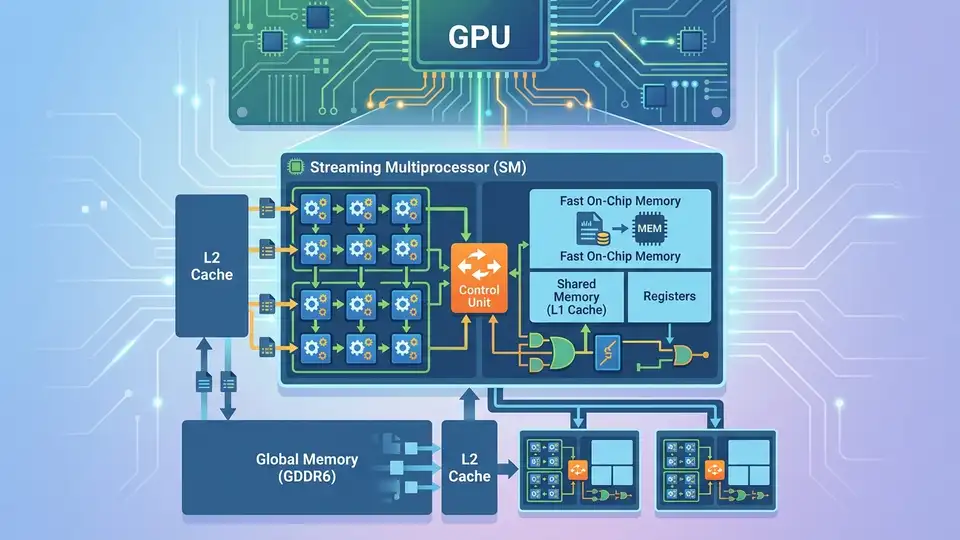
A modern GPU can pack thousands of CUDA cores, while a mainstream CPU often has 8 to 16 powerful cores. That difference explains why CUDA shines on workloads that can be split into many tiny, repeated tasks.
Think of a CPU like a few expert chefs handling complicated dishes one by one. A GPU is the giant kitchen where hundreds of cooks do the same simple step at the same time, and that is the whole trick behind CUDA performance.
What CUDA hardware is built to do
Get the latest AI news in your inbox
Weekly picks of model releases, tools, and deep dives — no spam, unsubscribe anytime.
No spam. Unsubscribe at any time.
CUDA is NVIDIA’s programming platform for running general-purpose code on its GPUs. The hardware matters because the GPU is built for throughput, not low-latency single-task execution like a CPU.
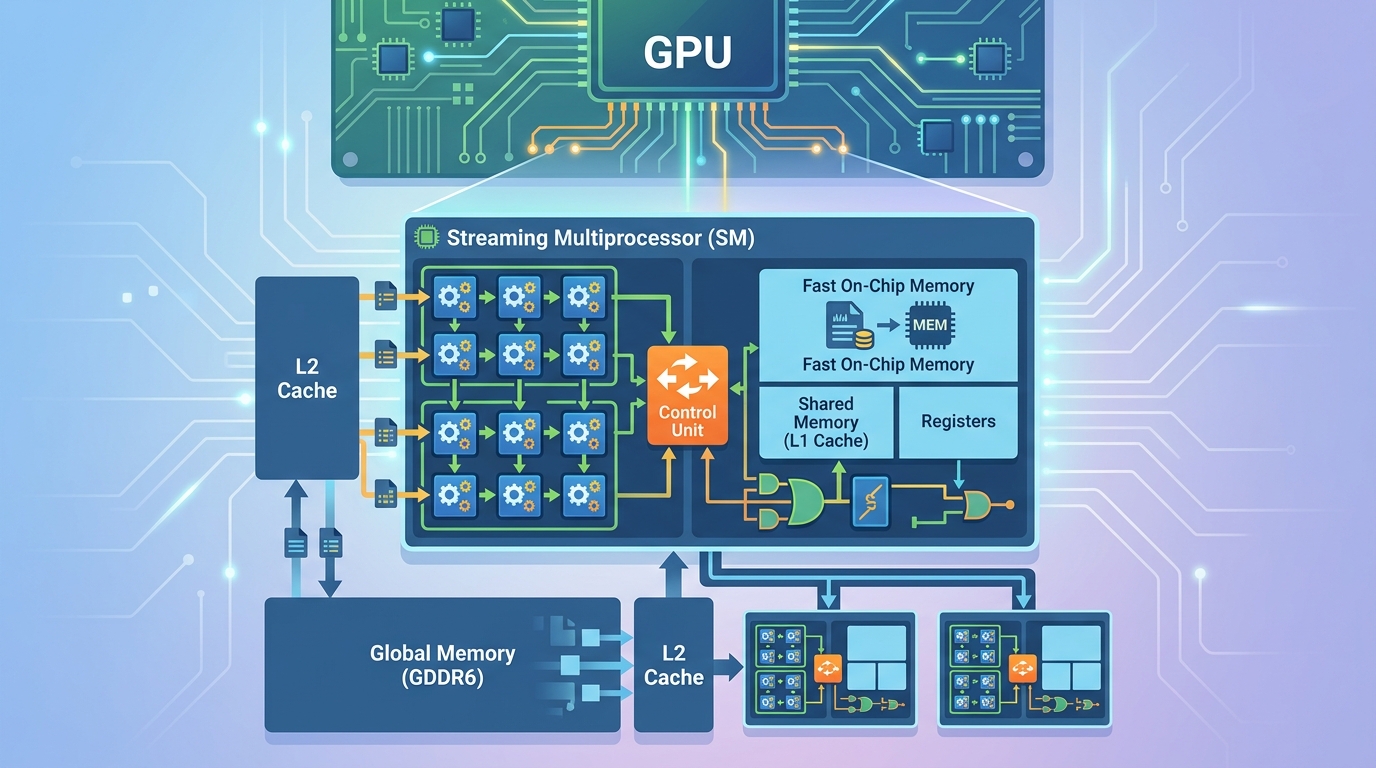
That design choice changes how you should think about problem solving. If your job is matrix math, image filters, particle simulations, or large-scale inference, the GPU can split the work into many identical operations and keep most of its execution units busy.
If your job is a chain of branch-heavy logic with lots of dependencies, the GPU may sit underused while the CPU finishes the task faster. CUDA performance is about matching the hardware to the workload.
- CPU cores are few and very capable at complex control flow.
- GPU cores are many and optimized for repeated arithmetic.
- CUDA gets its speed from parallel work, not from a single fast thread.
- Memory access patterns matter as much as raw compute.
Streaming Multiprocessors are the real scheduling units
The key block inside a CUDA GPU is the Streaming Multiprocessor, usually shortened to SM. An SM is where NVIDIA groups execution resources, schedules instructions, and feeds work to the cores.
Each SM contains its own scheduler and local resources, so a GPU can run many blocks of work in parallel across multiple SMs. That is why a GPU can look like one device from the outside while acting like a small army of coordinated workers inside.
“GPUs consist of many simple processing cores organized into streaming multiprocessors (SMs) or compute units (CUs), enabling massive parallelism.”
That quote is from the intro notes for a computer architecture class, and it captures the core idea cleanly. The SM is the unit that makes parallel execution practical instead of chaotic.
For developers, the takeaway is simple: you do not program the GPU as one big processor. You feed it many blocks of work, and the SMs decide how to distribute them.
CUDA cores are simple by design
Inside each SM, you find the CUDA cores that do the arithmetic. These cores are not trying to be miniature CPUs. They are simpler units built to run the same instruction across many data points efficiently.
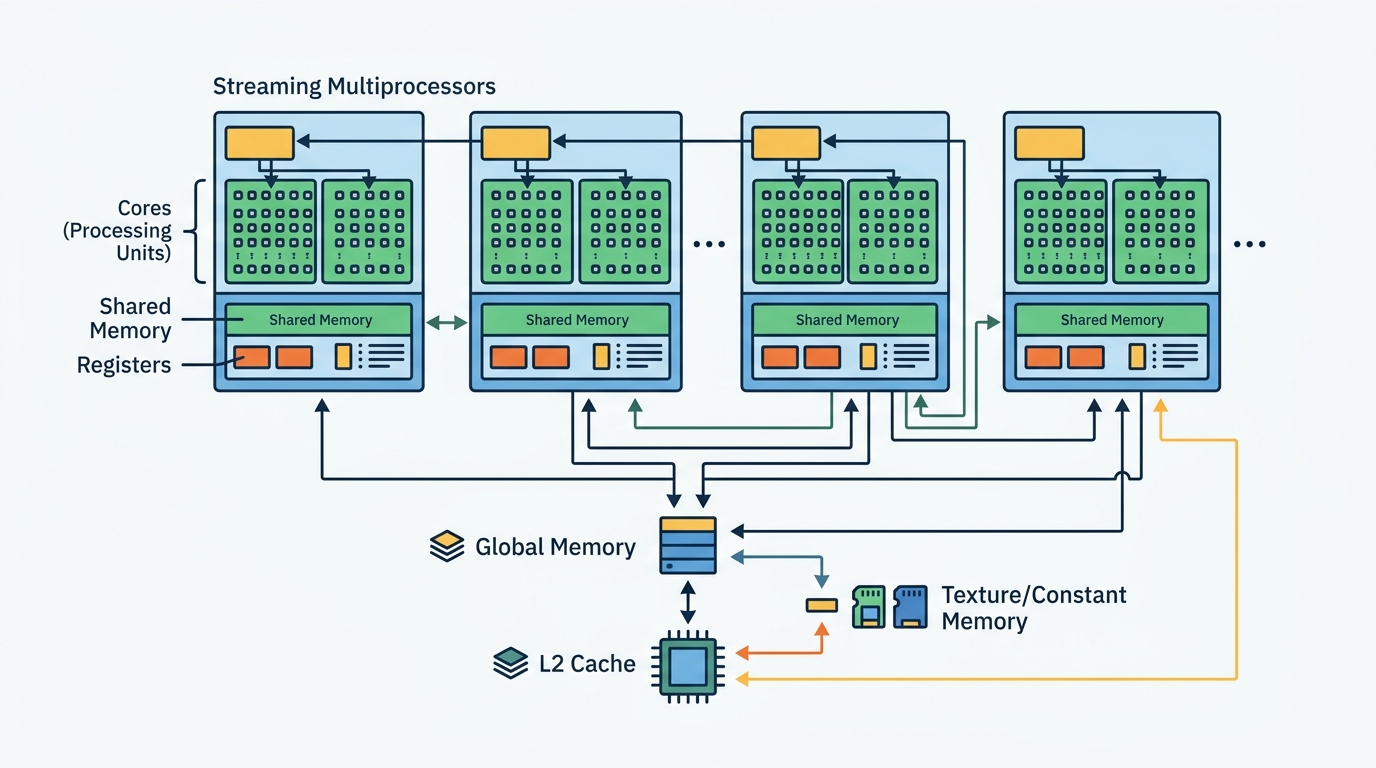
That simplicity is why GPU core counts look wild compared with CPU core counts. A high-end CPU may have 8 or 16 cores, while a data-center GPU can have thousands of CUDA cores. The point is not that each GPU core is stronger. The point is that the GPU has far more of them.
This matters in real workloads. A single CPU core can finish one branch of logic quickly, but a GPU can process a huge array of numbers in parallel if the code is shaped the right way.
- CPU cores are built for latency-sensitive work.
- CUDA cores are built for throughput on simple operations.
- Branch-heavy code reduces GPU efficiency.
- Uniform math across large arrays fits the GPU model well.
Memory hierarchy decides whether the GPU stays busy
Raw compute is only half the story. The GPU also needs data fast enough to keep all those cores occupied, which is why CUDA programming spends so much time on memory hierarchy.
NVIDIA’s memory hierarchy docs break the GPU into registers, shared memory, and global memory. Registers are private and extremely fast. Shared memory is local to an SM and lets threads cooperate. Global memory is large, but much slower.
That hierarchy is the difference between a kernel that flies and one that stalls. If threads keep reading from global memory for every tiny step, the GPU spends more time waiting than computing.
- Registers are the fastest storage, but each thread gets very little.
- Shared memory is fast and shared within an SM.
- Global memory is large and slow compared with the other two.
- Good CUDA code reduces trips to global memory.
Here is the practical rule: use registers for temporary values, shared memory for data reused by nearby threads, and global memory for large datasets that do not fit anywhere else. That is the part many beginners miss when they first compare CUDA to CPU programming.
Why this architecture beats CPUs on some jobs
The reason CUDA matters is not that GPUs are magically faster at everything. They win when the work is highly parallel, the math is repetitive, and the data can be arranged so many threads do useful work at once.
That is why graphics, scientific computing, simulation, and AI training fit so well. A single GPU can process huge batches of numbers in parallel, while a CPU often spends more time on control flow, cache management, and branch prediction.
The difference becomes clear when you compare the basic hardware model.
- A CPU might have 8 to 16 high-performance cores.
- A GPU can expose thousands of CUDA cores across many SMs.
- CPU design favors one thread finishing fast.
- GPU design favors many threads finishing together.
For a deeper look at how this affects real code, see our related guide on the CUDA programming model. Once you understand blocks, threads, and memory access, the hardware diagram starts to feel much less abstract.
It also helps to compare CUDA with other GPU ecosystems. AMD ROCm targets similar compute workloads on AMD hardware, while Intel oneAPI tries to unify development across CPUs, GPUs, and other accelerators. CUDA still has the deepest tooling on NVIDIA hardware, which is why it remains the default reference point for GPU compute.
Conclusion: CUDA rewards data-parallel thinking
CUDA architecture is simple to describe and hard to use well. The GPU is a machine built from many SMs, thousands of CUDA cores, and a memory system that punishes careless access patterns. If your code can split work into many identical pieces, CUDA can turn that into real speed.
The next question is not whether GPUs are fast. It is whether your algorithm can be rewritten so the SMs stay busy and global memory stays quiet. If you can answer yes, CUDA is worth the effort.
My prediction is straightforward: the developers who get the best results over the next few years will be the ones who think about memory traffic before they think about raw FLOPS. That is where CUDA performance is won.
// Related Articles
- [TOOLS]
Aliyun Bailian Token Plan turns credits into agents
- [TOOLS]
One API gateway turns six AI APIs into one
- [TOOLS]
OpenAI FDEs turn broken agents into shipped systems
- [TOOLS]
Anthropic’s daily brief turns news into a workflow
- [TOOLS]
Claude Reflect turns usage into retention
- [TOOLS]
Midjourney turns prompt ideas into art