How to Build a Milvus RAG Stack in 13 Steps
Build a production-ready Milvus RAG stack with embeddings, hybrid search, and LangChain.

Build a production-ready Milvus RAG stack with embeddings, hybrid search, and LangChain.
This guide is for developers who want to turn a clean Python project into a working retrieval-augmented generation stack on Milvus. After following the steps, you will have a local Milvus 2.6 environment, a document collection with vector and metadata fields, a hybrid search path, and a RAG chain you can adapt for production.
You will also know how to verify each stage, from server connection to indexed search, so you can catch setup issues early and ship with confidence.
Before you start
Get the latest AI news in your inbox
Weekly picks of model releases, tools, and deep dives — no spam, unsubscribe anytime.
No spam. Unsubscribe at any time.
- Python 3.10, 3.11, or 3.12
- Docker Engine 24.x or later with Compose V2
- 8 GB RAM minimum, 16 GB recommended
- 20 GB free disk space
- Milvus 2.6.x server image, such as Milvus docs and milvus-io/milvus
- pymilvus 2.6.x
- sentence-transformers latest stable
- LangChain 0.3+
- An OpenAI API key if you plan to use a hosted LLM for generation
Step 1: Create the Python project
Goal: ship a clean, isolated workspace with the exact client libraries needed for Milvus RAG.

Start with a virtual environment, upgrade packaging tools, and install the core dependencies for Milvus, embeddings, and orchestration.
mkdir milvus-rag-tutorial
cd milvus-rag-tutorial
python3.11 -m venv .venv
source .venv/bin/activate
python -m pip install --upgrade pip wheel
pip install pymilvus sentence-transformers langchain langchain-community langchain-openai tiktoken python-dotenv
Verification: run python -c "import pymilvus; print(pymilvus.__version__)" and you should see a 2.6.x version string.
Step 2: Start Milvus Standalone with Docker Compose
Goal: launch a local Milvus server that behaves close to production without needing a cluster.
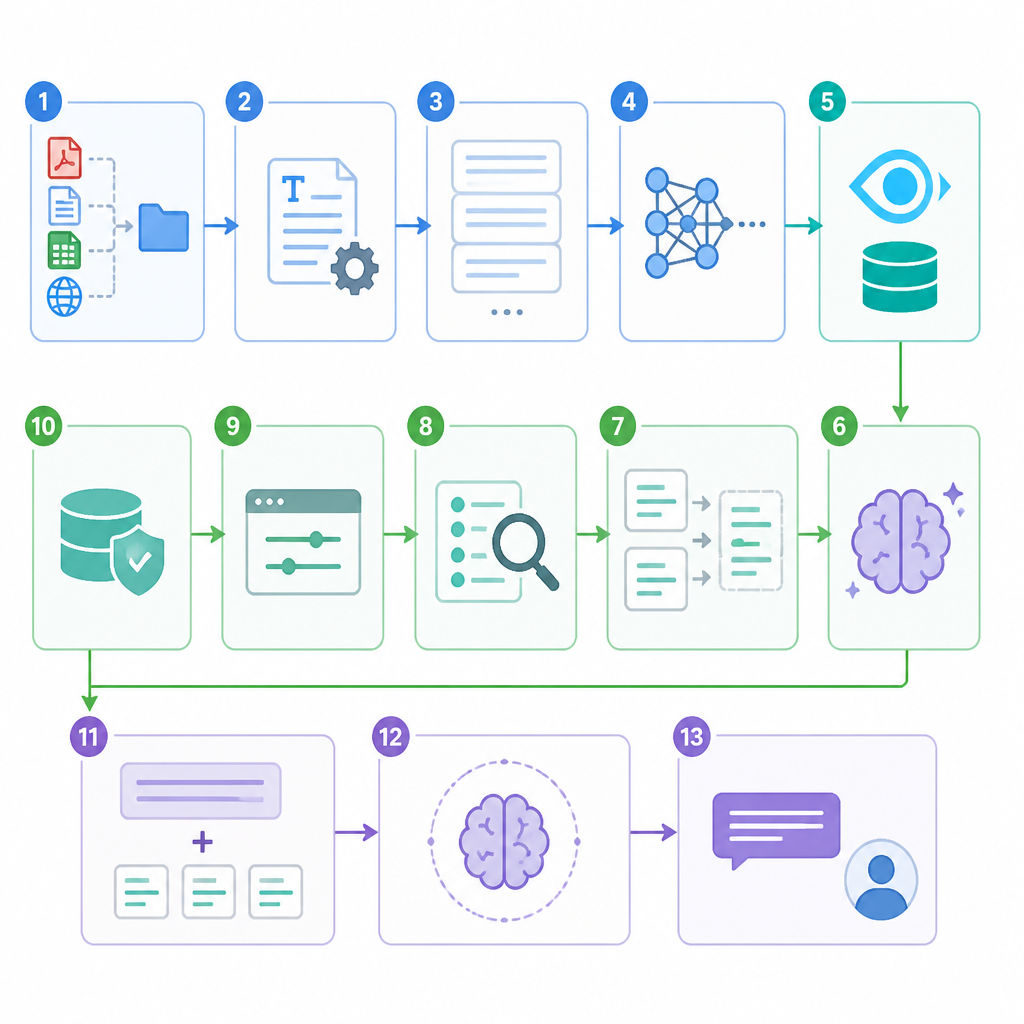
Create a Docker Compose file with Milvus, etcd, and MinIO, then pin the Milvus image to a specific patch release so your setup stays reproducible.
docker compose up -d
docker compose logs -f standalone | head -60
Verification: you should see messages like Proxy successfully started, listen on: [::]:19530 and the container should stay healthy.
Step 3: Connect the client to Milvus
Goal: confirm the Python client can reach the server and read its version.
Create a small connection helper with MilvusClient, then point it at http://localhost:19530 with the default root token for local testing.
from pymilvus import MilvusClient

client = MilvusClient(uri="http://localhost:19530", token="root:Milvus")
print(client.get_server_version())
print(client.list_collections())
Verification: you should see the Milvus server version and an empty collection list.
Step 4: Define the RAG collection schema
Goal: create a collection that can store document text, embeddings, and metadata for filtering.
Design fields for an ID, chunk text, a dense vector, and metadata such as source, title, or tenant. Keep the schema stable so it can move from local development to production without redesign.
from pymilvus import MilvusClient

client = MilvusClient(uri="http://localhost:19530", token="root:Milvus")
client.create_collection(
    collection_name="rag_docs",
    dimension=768,
    primary_field_name="id",
    vector_field_name="embedding",
    id_type="int64",
    metric_type="COSINE",
)
Verification: listing collections should now show rag_docs.
Step 5: Generate embeddings for your documents
Goal: turn raw text into dense vectors that Milvus can index and search.
Load a sentence-transformers model, embed your chunks, and keep the model choice consistent across ingestion and query time.
from sentence_transformers import SentenceTransformer

model = SentenceTransformer("all-MiniLM-L6-v2")
vectors = model.encode(["Milvus is a vector database.", "RAG uses retrieval before generation."])
Verification: you should get one vector per input string, and each vector should have the same dimension as your collection schema.
Step 6: Chunk and ingest a document corpus
Goal: load real content into Milvus so search results come from your own data.
Split documents into overlapping chunks, attach metadata, generate embeddings, and insert the rows into the collection in batches.
rows = [
  {"id": 1, "text": "...", "embedding": vectors[0], "source": "docs", "title": "Intro"}
]
client.insert(collection_name="rag_docs", data=rows)
Verification: the insert call should return inserted IDs, and the collection row count should increase.
Step 7: Create and load the vector index
Goal: make search fast by building an ANN index on the embedding field.
Start with AUTOINDEX for simplicity, or choose HNSW, IVF_FLAT, or DISKANN when you need explicit control over latency and memory tradeoffs.
client.create_index(
    collection_name="rag_docs",
    field_name="embedding",
    index_params={"index_type": "AUTOINDEX", "metric_type": "COSINE"},
)
client.load_collection(collection_name="rag_docs")
Verification: the collection should report as loaded, and search requests should no longer fail with an unloaded-collection error.
Step 8: Run your first semantic search
Goal: confirm the retrieval layer returns relevant chunks for a natural-language query.
Encode the query with the same embedding model, then search the collection and inspect the top results and scores.
query_vec = model.encode(["What is Milvus used for?"])[0]
results = client.search(
    collection_name="rag_docs",
    data=[query_vec],
    limit=5,
    output_fields=["text", "title", "source"],
)
Verification: you should see the most relevant chunks near the top, with scores that make sense for your metric type.
Step 9: Add metadata filtering for hybrid retrieval
Goal: narrow results to the right document set before generation.
Use scalar fields such as source, tenant, or category to filter the candidate set and reduce noise in the final answer.
results = client.search(
    collection_name="rag_docs",
    data=[query_vec],
    filter='source == "docs"',
    limit=5,
    output_fields=["text", "title", "source"],
)
Verification: the returned rows should only match the filter you set, which confirms the metadata path is working.
Step 10: Wire Milvus into a LangChain RAG chain
Goal: connect retrieval results to a prompt and LLM so the system can answer questions end to end.
Wrap the Milvus search call in a retriever interface, pass the retrieved context into your prompt, and generate the final answer with your model of choice.
# Pseudocode pattern
# query -> Milvus search -> top chunks -> prompt template -> LLM answer
Verification: ask a question about your corpus and you should get a grounded answer that cites the retrieved content.
Step 11: Add BM25 hybrid search for rare terms
Goal: improve recall when users search for exact names, codes, or uncommon words.
Combine dense vectors with sparse retrieval so semantic search and keyword search work together instead of competing.
# Configure sparse retrieval alongside dense retrieval
# Then merge or rerank results before generation
Verification: queries with rare tokens should return better matches than dense search alone.
Step 12: Benchmark and tune the index
Goal: choose the right index settings for your latency, memory, and recall target.
Test HNSW for low-latency in-memory search, IVF_FLAT for balanced performance, DISKANN for large disk-backed collections, and AUTOINDEX when you want Milvus to choose the default path.
Verification: after tuning, you should see faster search or lower memory use without a major drop in result quality.
| Metric | Before/Baseline | After/Result |
|---|---|---|
| BM25 search speed | Elasticsearch baseline | Milvus team claims 400% faster in 2.6 |
| Embedding memory footprint | FP32 vectors | About half with FP16/BF16 conversion |
| Deployment size | Cluster-only setup | Lite, Standalone, or Distributed options |
Step 13: Secure and ship to production
Goal: harden the stack so it can run outside the laptop.
Rotate the default root token, separate query and insert traffic, back up volumes, and move from local Docker to a managed or Helm-based deployment when your workload grows.
# Production checklist
# - change credentials
# - snapshot data volumes
# - monitor query latency
# - test restore procedures
Verification: you should be able to restart the stack, reconnect, and still list the same collections and row counts.
- Mismatched client and server versions: if
pymilvusand Milvus differ in minor version, reinstall the matching client and rerun the connection check. - Unloaded collection errors: if search fails after ingest, call
load_collectionbefore querying and confirm the load state. - Wrong embedding dimension: if inserts fail, make sure the model output dimension matches the collection schema exactly.
What’s next: extend this stack with reranking, multi-tenant partitions, observability, and a production deployment on Kubernetes or Zilliz Cloud.
- Use
docker compose down -vonly when you want a full reset. - Keep the same embedding model for both ingestion and query time.
- Pin image tags and Python package versions for repeatable builds.
// Related Articles
- [TOOLS]
Windsurf turns coding into agent-driven editing
- [TOOLS]
Cursor’s latest update proves IDEs must become workflow tools
- [TOOLS]
Cursor’s Bugbot belongs before the push, not in the PR
- [TOOLS]
Prompt engineering is a writing skill, not a magic trick
- [TOOLS]
Open-Notebook turns NotebookLM into open source
- [TOOLS]
GPU Mag’s list turns GPU tests into a workflow